
Why This Matters
If you’ve shipped a SwiftUI app and noticed subtle jank in a long list, a screen that doesn’t update when it should, or — worse — a screen that shows stale UI silently, the answer is often somewhere in the rendering pipeline. Not in your business logic. Not in your networking layer. Somewhere between “state changed” and “pixels updated.”
Understanding this pipeline doesn’t just make you a better debugger. It makes you a better architect — because every decision you make about how you model state and how you structure views has a consequence here.
A note before we start: This article uses
ObservableObject/@Publishedfor its examples, because that’s still the most widely deployed model in production codebases. Swift 5.9+ introduces the@Observablemacro (Observation framework), which changes how SwiftUI tracks dependencies — it tracks individual property access insidebodyrather than observing the whole object. I’ll flag where this matters. If you’re on iOS 17+ only, the mental model in this post still holds; the trigger mechanism is just more precise.
Let’s walk through it completely.
The Three Layers of Cost
Before anything else, you need to internalize this:
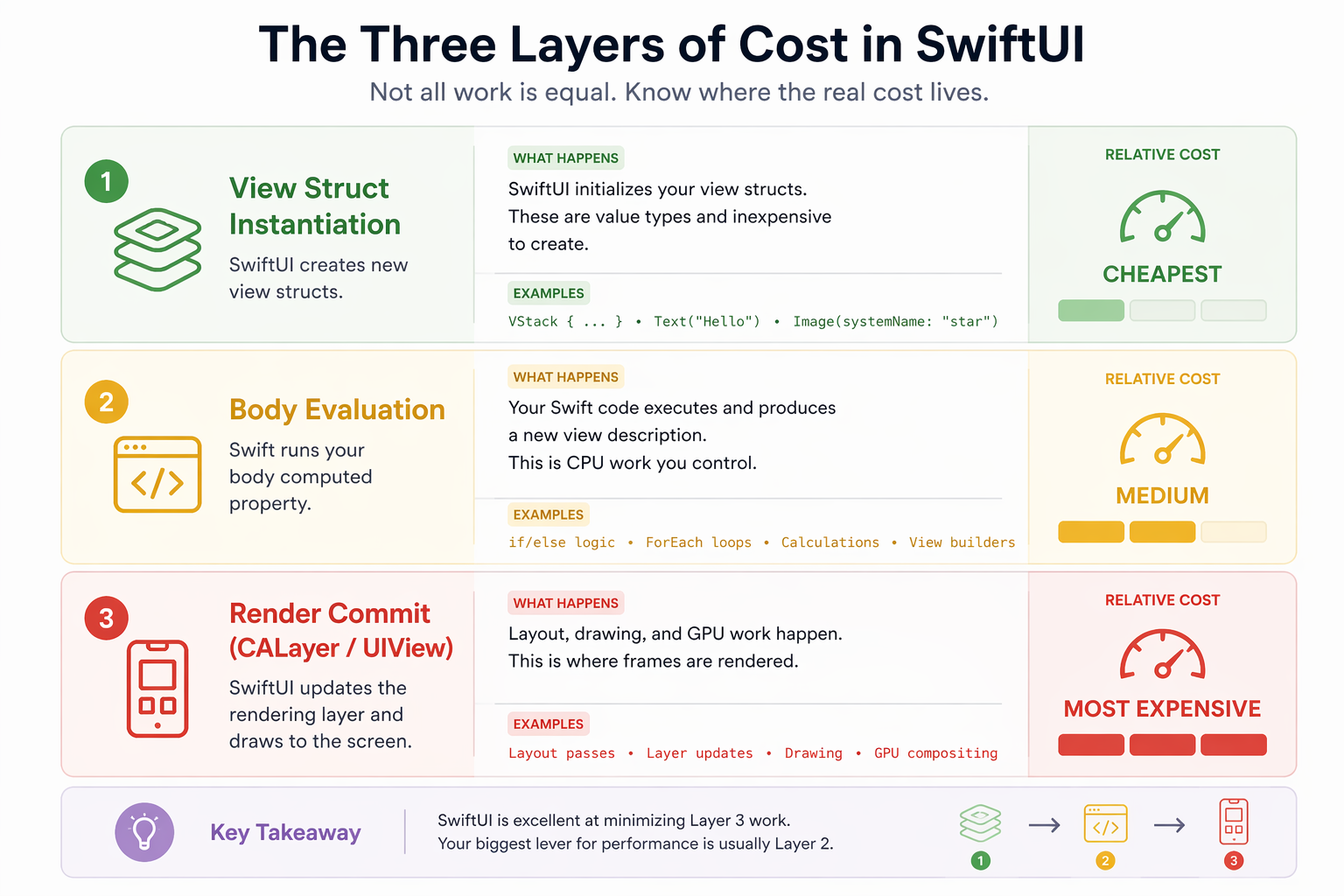
Most developers coming from UIKit are laser-focused on Level 3 — and for good reason. UIKit’s reloadData() was brutal. SwiftUI usually avoids render-layer work unless the diff requires it, so Level 3 is largely handled for you.
But Level 2 is where you have meaningful control. SwiftUI can skip work in many cases on its own, but it often lacks enough semantic information about your intent — especially in complex views or when non-visual state changes. Equatable gives it that signal explicitly.
It’s also worth saying upfront: not all body evaluations are expensive. A simple Text view evaluating its body costs almost nothing. The problem isn’t a single evaluation — it’s repeated unnecessary work across large hierarchies or during frequent updates. Keep that in mind as you read. This is a scalpel, not a hammer.
In many real-world cases, this becomes the most important lever you have.
Step 1 — The Trigger: How SwiftUI Knows Something Changed
Everything starts with state. There are two trigger mechanisms in modern SwiftUI, and the distinction matters.
Legacy: ObservableObject + @Published
When you use @ObservedObject or @StateObject, your view subscribes to the view model’s objectWillChange publisher. Any @Published property change fires this publisher — and SwiftUI schedules a re-evaluation of every view that depends on that object.
class FeedViewModel: ObservableObject {
    @Published var cards: [CardData] = []
}
When cards changes, objectWillChange fires. Every view observing this object gets notified — regardless of whether it actually reads cards in its body.
Modern: @Observable (Swift 5.9+, iOS 17+)
With the @Observable macro, SwiftUI tracks changes to individual observable properties that are read inside a view’s body. Only views that actually read a given property are invalidated when that property changes.
@Observable
class FeedViewModel {
    var cards: [CardData] = []
}
This is a meaningful upgrade — it eliminates a whole class of unnecessary re-evaluations at the trigger level, before any of the other gates in the pipeline even come into play.
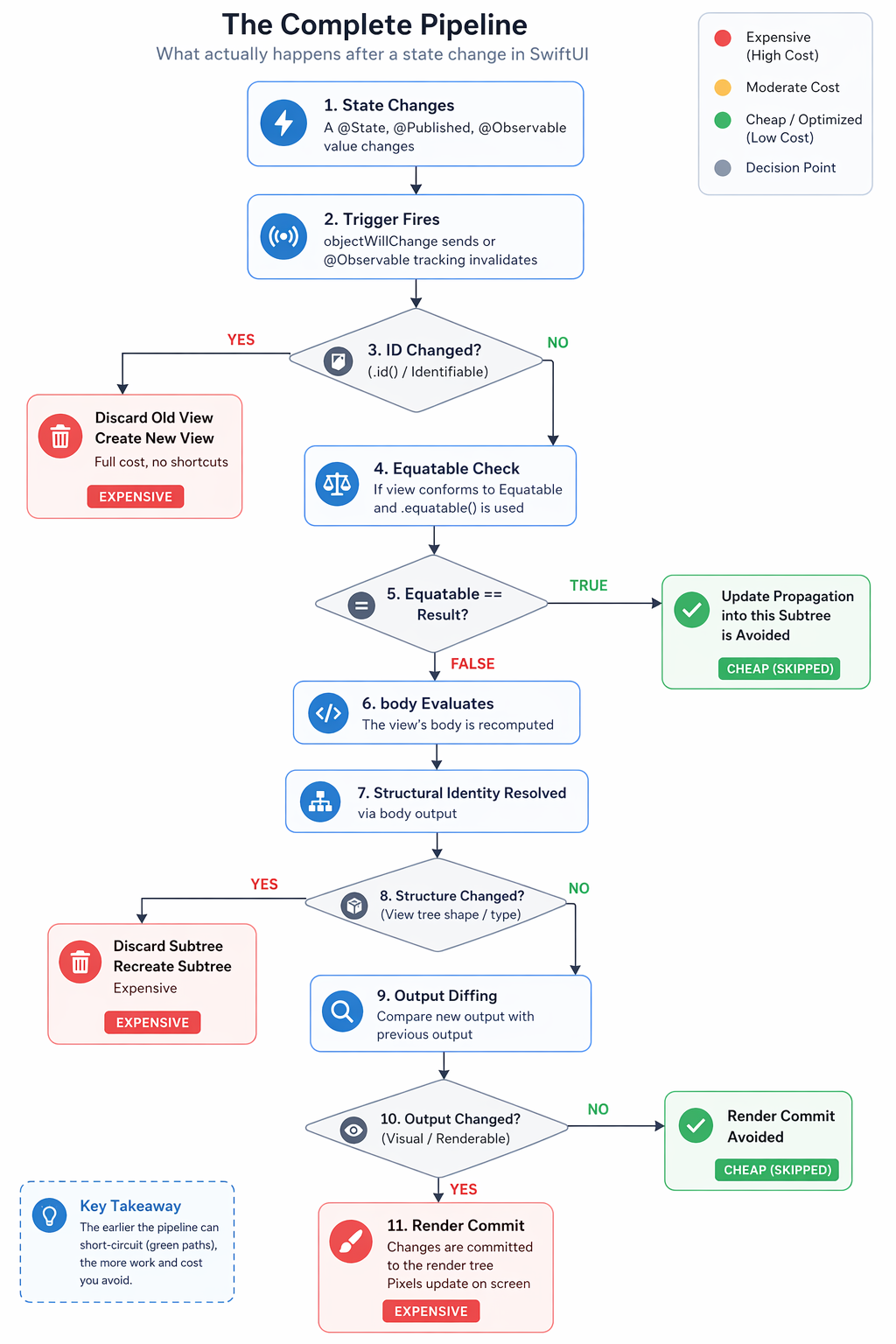
Either way, once the trigger fires, SwiftUI effectively evaluates a series of conditions — and each can stop work from progressing further.
Step 2 — View Identity: Is This the Same View or a New One?
Before SwiftUI does anything with your data, it needs to answer a more fundamental question: is the view it’s about to update the same view as before, or a completely new one?
This is controlled by two mechanisms.
Explicit Identity — Identifiable and .id()
In a ForEach, the id you provide is explicit identity. It tells SwiftUI: “this is how you recognize the same logical item across renders.”
ForEach(viewModel.cards) { card in // uses card.id
    CardView(card: card)
}
If the ID changes: SwiftUI treats it as a new view instance and recreates that subtree, rather than attempting to reconcile it with the previous one. Any @State inside that view is wiped. This is the most expensive outcome.
If the ID stays the same: SwiftUI recognizes this as the same view and moves to the next question.
A common mistake: using unstable IDs — like UUID() generated at render time. Every render produces a new ID, SwiftUI discards and recreates every view, every time. You get correct UI but at maximum cost.
Structural Identity — The Shape of Your View Hierarchy
Even without explicit IDs, every view in SwiftUI has a structural identity — its type and position in the view hierarchy, determined at compile time.
var body: some View {
    if isLoggedIn {
        DashboardView()  // type A at this position
    } else {
        LoginView()      // type B at this position
    }
}
When isLoggedIn flips, the view type at that position changes. SwiftUI treats this similarly to an identity change in terms of outcome — the previous subtree is discarded and a new one is created — though the underlying mechanism differs from explicit ID changes.
Important: The branch an if or switch takes inside body is runtime state — SwiftUI must evaluate the view description to determine which branch is active. Because of this, structural identity changes are discovered through body evaluation, not before it.
Step 3 — The Equatable Gate: Should Body Even Run?
This is a commonly overlooked optimization layer — and the one this post focuses on.
Once SwiftUI has confirmed view identity is stable (same ID, same structural position), it needs to decide: should I re-evaluate body?
By default, with no Equatable conformance, SwiftUI will re-evaluate body in many cases — because it lacks enough information to prove it can safely skip it. With newer systems like @Observable, SwiftUI has more to work with, but the general principle holds: the more information you give SwiftUI, the more work it can avoid. It runs body, gets the new output, and compares.
But if your view conforms to Equatable and you apply .equatable() (or wrap with EquatableView), SwiftUI compares the new view value against the old one using your ==. Apple documents this as a signal that prevents a child view from updating when the new value equals the old one — which, in practice, can prevent SwiftUI from propagating updates into that subtree:
Equatable == returns true  → update propagation into the subtree is avoided
Equatable == returns false → standard update path (body, diffing, render)
No Equatable               → standard update path
The practical benefit is that downstream work — body evaluation, diffing, and the render commit for that subtree — can be avoided when == returns true. Apple does not publicly guarantee the exact internal order of skips, but the observable outcome is that a subtree you’ve marked Equatable does not re-run its body when inputs compare equal. For expensive views, this is where Equatable earns its place.
Step 4 — Body Evaluation and Output Diffing
If body does run, SwiftUI produces a new view description and compares it against the previous one. This is the diffing step.
If the output is identical — same view types, same property values, same positions — SwiftUI skips the render commit. Level 3 cost is avoided automatically.
This is the safety net. Even without Equatable, if your body runs but produces identical output, the screen doesn’t update. The cost is the body evaluation itself — Level 2. For simple views, this is negligible. For complex views at scale, it compounds.
Step 5 — Render Commit
Only if the output diffing finds a genuine difference does SwiftUI commit changes to the render layer — updating CALayer properties, triggering layout passes, pushing to the GPU.
This is the step SwiftUI is best known for optimizing. And rightfully so. But it’s the last gate, not the only one.
The Complete Pipeline
Proving It — A Benchmark
Theory is good. Numbers are better. Here’s the complete benchmark I ran locally — you can drop this directly into a new Xcode project and run it yourself.
A few things worth noting before you look at the numbers:
- This uses
VStack, notLazyVStack. All 50 views are eagerly rendered — SwiftUI has no lazy-loading shortcut to hide behind. Every body evaluation is real work. - The counter increment inside
bodyis a side effect used purely for measurement. Never do this in production —bodyshould always be a pure computed property. - Treat the results as a demonstration from this specific setup, not a universal guarantee. SwiftUI’s internals evolve across iOS versions.
import SwiftUI

// MARK: - Counter (global for simplicity — benchmarking only)
class EvalCounter: ObservableObject {
    var withoutEquatable = 0
    var withEquatable = 0
    func reset() { withoutEquatable = 0; withEquatable = 0 }
}

let counter = EvalCounter()

// MARK: - Model with 8 properties, only 2 are visual
struct CardData: Identifiable {
    let id: Int
    let title: String            // ← VISUAL
    let subtitle: String         // ← VISUAL
    var trackingId: String       // non-visual
    var analyticsTag: String     // non-visual
    var serverTimestamp: Date    // non-visual
    var internalRank: Double     // non-visual
    var experimentBucket: String // non-visual
    var debugMetadata: String    // non-visual
}

// MARK: - WITHOUT Equatable
struct CardViewNormal: View {
    let card: CardData

    var body: some View {
        // ⚠️ Side effect for benchmarking only — never do this in production
        counter.withoutEquatable += 1
        return VStack(alignment: .leading, spacing: 2) {
            Text(card.title).font(.headline)
            Text(card.subtitle).font(.subheadline)
        }
        .padding(6)
    }
}

// MARK: - WITH Custom Equatable (only visual props in ==)
struct CardViewEquatable: View, Equatable {
    let card: CardData

    static func == (lhs: CardViewEquatable, rhs: CardViewEquatable) -> Bool {
        // Only comparing what's visually rendered
        lhs.card.title == rhs.card.title &&
        lhs.card.subtitle == rhs.card.subtitle
    }

    var body: some View {
        // ⚠️ Side effect for benchmarking only — never do this in production
        counter.withEquatable += 1
        return VStack(alignment: .leading, spacing: 2) {
            Text(card.title).font(.headline)
            Text(card.subtitle).font(.subheadline)
        }
        .padding(6)
    }
}

// MARK: - ViewModel
class FeedViewModel: ObservableObject {
    @Published var cards: [CardData]

    init() {
        self.cards = (0..<50).map { i in
            CardData(
                id: i,
                title: "Card \(i)",
                subtitle: "Subtitle \(i)",
                trackingId: UUID().uuidString,
                analyticsTag: "tag_\(i)",
                serverTimestamp: Date(),
                internalRank: Double(i),
                experimentBucket: "bucket_A",
                debugMetadata: "meta_\(i)"
            )
        }
    }

    // Changes ONLY non-visual properties across all 50 cards.
    // title and subtitle stay exactly the same.
    func triggerNonVisualUpdate() {
        cards = cards.map { card in
            CardData(
                id: card.id,
                title: card.title,        // unchanged
                subtitle: card.subtitle,  // unchanged
                trackingId: UUID().uuidString,            // changed
                analyticsTag: "tag_updated",              // changed
                serverTimestamp: Date(),                  // changed
                internalRank: Double.random(in: 0...100), // changed
                experimentBucket: "bucket_B",             // changed
                debugMetadata: "meta_updated_\(card.id)"  // changed
            )
        }
    }
}

// MARK: - Benchmark View
struct BenchmarkView: View {
    @StateObject var viewModel = FeedViewModel()
    @State private var result = ""

    var body: some View {
        ScrollView {
            VStack(spacing: 16) {
                Text("SwiftUI Custom Equatable Benchmark")
                    .font(.headline)
                    .multilineTextAlignment(.center)

                Text("Trigger changes ONLY non-visual properties.\nVisual output stays identical.")
                    .font(.caption)
                    .foregroundColor(.secondary)
                    .multilineTextAlignment(.center)

                Button("Trigger Non-Visual Update") {
                    counter.reset()
                    viewModel.triggerNonVisualUpdate()

                    DispatchQueue.main.asyncAfter(deadline: .now() + 0.1) {
                        result = """
                        Without .equatable(): \(counter.withoutEquatable) body calls
                        With    .equatable(): \(counter.withEquatable) body calls
                        """
                    }
                }
                .buttonStyle(.borderedProminent)

                if !result.isEmpty {
                    Text(result)
                        .font(.system(.body, design: .monospaced))
                        .padding()
                        .background(Color(.systemGray6))
                        .cornerRadius(10)
                }

                Divider()

                Text("Without .equatable()")
                    .font(.caption).foregroundColor(.secondary)

                // VStack (not LazyVStack) — all 50 views rendered eagerly
                VStack(spacing: 0) {
                    ForEach(viewModel.cards) { card in
                        CardViewNormal(card: card)
                        Divider()
                    }
                }

                Divider()

                Text("With .equatable()")
                    .font(.caption).foregroundColor(.secondary)

                // VStack (not LazyVStack) — all 50 views rendered eagerly
                VStack(spacing: 0) {
                    ForEach(viewModel.cards) { card in
                        CardViewEquatable(card: card)
                            .equatable()
                        Divider()
                    }
                }
            }
            .padding()
        }
    }
}

#Preview {
    BenchmarkView()
}
Measured result on my device (iPhone simulator, iOS 17):
Without .equatable():  50 body calls
With    .equatable():   0 body calls
50 body evaluations vs zero. The screen looked identical in both cases — because the visual data never changed. But one version did 50 units of unnecessary work on every non-visual state update. In a real app, with heavier views and more frequent updates, this kind of gap is where subtle jank originates.
This test isolates a case where SwiftUI cannot infer that non-visual changes are irrelevant. In simpler views, or with @Observable’s property-level tracking on iOS 17+, SwiftUI may already avoid some of this work on its own.
Run it yourself and paste your numbers in the comments. The full source is also on GitHub — link below.
Using Equatable — Two Approaches
Approach 1: .equatable() modifier
ForEach(viewModel.cards) { card in
    CardViewEquatable(card: card)
        .equatable()
}
Approach 2: EquatableView wrapper
ForEach(viewModel.cards) { card in
    EquatableView(content: CardViewEquatable(card: card))
}
Both achieve the same outcome. .equatable() is more idiomatic. EquatableView is more explicit — useful when you want the optimization to be immediately visible to the next engineer reading the code.
When NOT to Use Equatable
Equatable is a scalpel, not a default pattern. Before reaching for it, ask whether it actually buys you anything.
Don’t use it if your view is lightweight. If body contains only a Text and a Color, the evaluation cost is negligible. The overhead of writing and maintaining a custom == outweighs any gain.
Don’t use it if all your properties are visual. The only optimization opportunity is in properties you can safely exclude from ==. If every property drives something on screen, your == can’t exclude anything — and auto-synthesized Equatable would perform the same full comparison SwiftUI would do anyway.
Don’t use it if the view changes frequently. If your data updates on every frame or every second, the equality check itself becomes a cost. You’re paying for a comparison that almost always returns false — and body runs anyway.
Be cautious in large teams. Custom == is invisible to the compiler. When a new engineer adds a property and forgets to update ==, the bug is silent. The larger and faster-moving your codebase, the higher the probability of this happening.
The right mental model: reach for Equatable when you have a view with a clear separation between visual properties and non-visual properties — analytics, tracking IDs, server timestamps, internal ranking scores. If that separation doesn’t exist in your view, neither does the benefit.
The Risks — Read This Before You Use It
Equatable is a contract with SwiftUI. The contract is: “When I tell you these two instances are equal, you can safely skip everything.” Breaking that contract doesn’t crash your app. It silently shows the wrong UI. That’s worse.
Risk 1 — Excluding a Visual Property
static func == (lhs: Self, rhs: Self) -> Bool {
    lhs.title == rhs.title
    // subtitle excluded by mistake
}
If subtitle changes, == returns true, body is skipped, screen shows old subtitle. Silent bug.
Risk 2 — Excluding a Structural Property
struct CardView: View, Equatable {
    let title: String
    let isPremium: Bool  // drives an if/else inside body

    static func == (lhs: Self, rhs: Self) -> Bool {
        lhs.title == rhs.title
        // isPremium excluded — DANGEROUS
    }

    var body: some View {
        if isPremium {
            PremiumCardView(title: title)
        } else {
            StandardCardView(title: title)
        }
    }
}
isPremium flips. == ignores it. Returns true. SwiftUI treats these two view values as equal and avoids propagating the update into that subtree — which means it may preserve the old subtree longer than intended. The structural identity change your code expected never gets discovered. The user sees the wrong view until something else forces a full recreation.
This is the real contract violation: you told SwiftUI “these are the same,” and SwiftUI believed you. The consequence isn’t a crash — it’s a subtree that lives past its expiry date.
Rule: Every property that drives a structural decision inside body must be in ==.
Risk 3 — The Maintenance Burden
This is the most underappreciated risk. Custom == is manual code. Every time you add a new property to your view that affects visual output or structure, you must update ==. The compiler will not warn you if you forget.
// Month 1
static func == (lhs: Self, rhs: Self) -> Bool {
    lhs.title == rhs.title &&
    lhs.subtitle == rhs.subtitle
}

// Month 3 — new property added, == not updated
// Now badgeCount changes are silently ignored
var badgeCount: Int  // ← added but forgotten in ==
This is a real maintenance cost in team settings. Every engineer touching the view needs to understand this contract — or they will break it without realizing.
The Decision Framework
Before reaching for Equatable, run your properties through this classification:
Property drives visual output?        → Must be in ==
Property drives structural decisions? → Must be in ==
Property is non-visual, non-structural
  (analytics, timestamps, tracking)?  → Safe to exclude from ==
The optimization opportunity lives entirely in that third category. If your view has no Category 3 properties, Equatable gives you nothing except maintenance overhead.
Summary — The Full Mental Model
| Pipeline Step | What controls it | Auto-optimized? |
|---|---|---|
| Trigger | ObservableObject / @Observable |
N/A |
| View identity | id / Identifiable |
N/A |
| Update skip for subtree | Equatable + .equatable() |
❌ Your responsibility |
| Structural identity | View hierarchy shape | ✅ SwiftUI handles |
| Output diffing | SwiftUI internal diff | ✅ SwiftUI handles |
| Render commit | Render layer | ✅ SwiftUI handles |
SwiftUI can skip body evaluation in many cases on its own, but it doesn’t always have enough semantic information about your intent — especially when non-visual state changes. That’s where Equatable becomes your lever. Use it deliberately, with full awareness of the contract you’re making and the maintenance cost you’re accepting.
The engineers who understand this pipeline don’t just write faster apps. They write apps that stay fast as they scale — because they know exactly where the cost lives and exactly which tool addresses it.
If there’s one takeaway: most performance issues in SwiftUI aren’t about rendering — they’re about unnecessary work before rendering even becomes necessary.
I write about iOS engineering, architecture decisions, and the things I’m learning building at scale at Target. If this was useful, I’d love to hear your take — especially if you’ve hit edge cases with custom Equatable in production.
References and Further Reading
If this post sparked curiosity and you want to go deeper, these are the resources I’d point you to — in the order I’d recommend reading them.
1. WWDC 2021 — Demystify SwiftUI (Session 10022) The single most important session for understanding SwiftUI’s internals. Apple engineers walk through identity (explicit vs structural), lifetime, and how the dependency graph decides what to re-evaluate. Everything in this post about structural identity and view lifetime traces back to this session. 👉 developer.apple.com/videos/play/wwdc2021/10022
2. WWDC 2023 — Discover Observation in SwiftUI (Session 10149)
Covers the @Observable macro introduced in iOS 17, which fundamentally changed how SwiftUI tracks state. Instead of observing an entire object, SwiftUI now tracks individual property access inside body. If you’re building for iOS 17+, this changes parts of the mental model in this post — in a good way.
👉 developer.apple.com/videos/play/wwdc2023/10149
3. WWDC 2021 — Swift Concurrency: Behind the Scenes (Session 10254)
Not directly SwiftUI — but if you’re thinking about how @MainActor, async/await, and state updates interact with the rendering pipeline, this session gives you the foundation. Relevant as soon as your state management touches concurrency.
👉 developer.apple.com/videos/play/wwdc2021/10254
4. Swift Evolution — SE-0395: Observation (the @Observable proposal)
The formal Swift Evolution proposal behind the @Observable macro. Drier than a WWDC session but more precise — explains exactly why the old ObservableObject / @Published model had limitations and how property-level observation solves them.
👉 github.com/apple/swift-evolution/…/0395-observability.md
5. Swift Forums — SwiftUI and Observation The Swift Forums have ongoing discussions where Apple engineers occasionally clarify behavior that isn’t documented elsewhere. Searching “SwiftUI Equatable body evaluation” and “SwiftUI observation” surfaces threads that go beyond what’s covered in official docs. 👉 forums.swift.org
6. Apple Documentation — EquatableView
Short but worth reading directly. Understanding what Apple says this type does — and what it deliberately doesn’t say — is informative in itself.
👉 developer.apple.com/documentation/swiftui/equatableview
A note on SwiftUI internals: Apple does not publicly document the full rendering pipeline. Some of what’s covered in this post — particularly around how SwiftUI’s attribute graph works internally — is inferred from WWDC sessions, empirical benchmarking, and community research. If you find behavior that contradicts something here across iOS versions, I’d genuinely want to know.